
How to Choose an iPhone Photo Cleaner: Features, Experience, and Price Comparison
Compare Slidebox, CleanMyPhone, Cleanup, Swipewipe, and LessPhoto by features, experience, and price to find the right iPhone photo cleaner.
Why choosing a photo cleaner matters
The iPhone Photos app can handle some duplicates, but it does not identify similar burst photos. Reviewing them manually takes time and effort.
Many people therefore look for a photo cleaner. The options may look similar in the App Store, but some focus on manual sorting, some on automatic scanning, and some put features behind a subscription.
This article compares five popular options: Slidebox, CleanMyPhone, Swipewipe, Cleanup, and LessPhoto.
Feature comparison
The table compares common cleanup features. “✓” means the app includes the feature; “✓✓” means the feature is one of its strengths.
| Feature | LessPhoto | Slidebox | CleanMyPhone | Cleanup | Swipewipe |
|---|---|---|---|---|---|
| Duplicate photos | ✓ | No | ✓ | ✓ | ✓ |
| Similar photos | ✓✓ | No | ✓ | ✓ | ✓ |
| Swipe sorting | ✓ | ✓✓ | No | No | ✓ |
| Screenshots | ✓ | No | ✓ | ✓ | ✓ |
| Large photo or video compression | ✓ | No | ✓ | ✓ | ✓ |
| Album organization | ✓ | ✓ | No | No | ✓ |
| Email or contact cleanup | No | No | ✓ | ✓ | No |
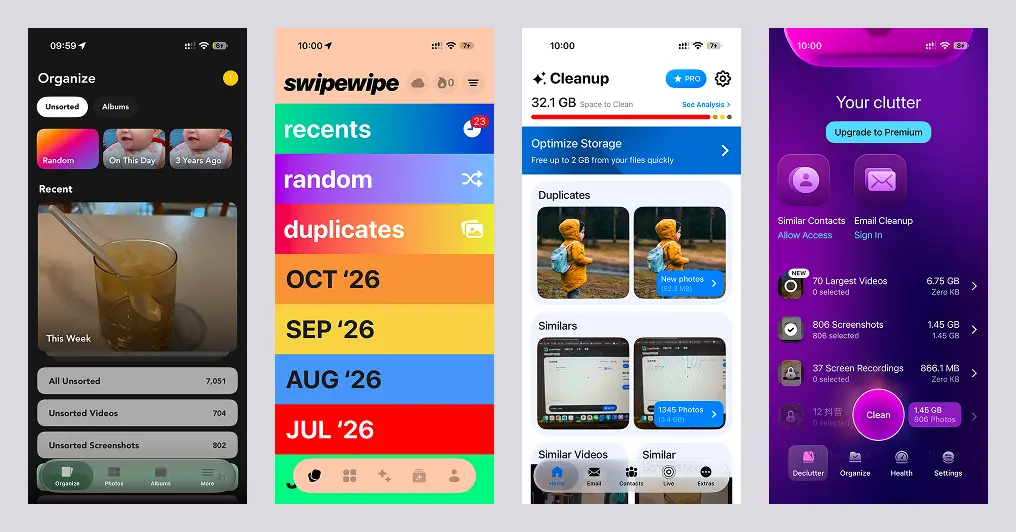
Slidebox: Focuses on swipe sorting, but has few features. It suits people who organize photos into albums, although swipe sorting is not very smooth.
CleanMyPhone and Cleanup: Both offer many features, but you may not need contact cleanup. Paying for bundled tools may not feel worthwhile.
Swipewipe: Focuses on swipe sorting and offers many features. The interface looks stylish, but can feel busy and difficult to navigate.
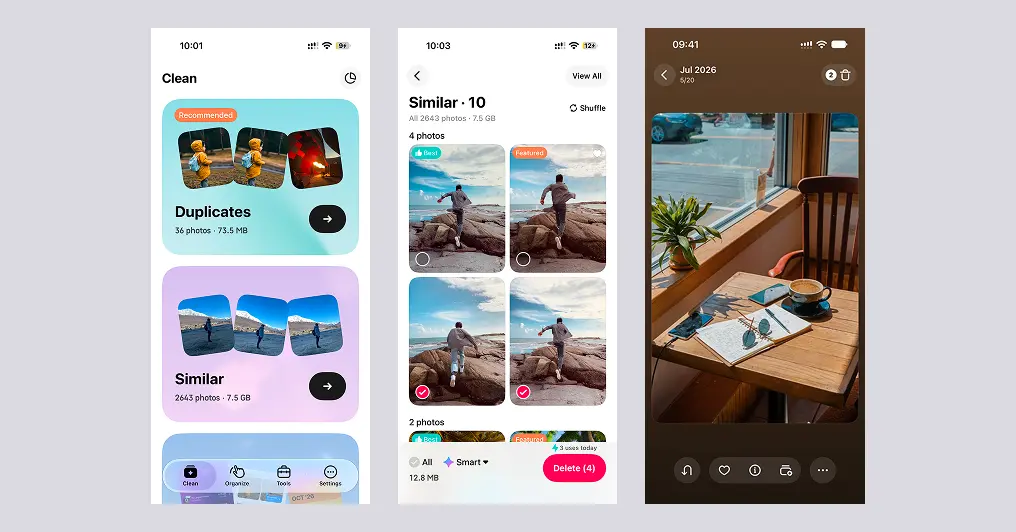
LessPhoto: Focuses on duplicate and similar photo cleanup, while also offering swipe sorting. The interface is simple and easy to use.
The interaction matters too
Batching similar photos is useful: I like LessPhoto’s batching workflow, so I do not have to select too many photos at once. Cleanup made me select more than a thousand photos at once. I had to choose carefully, and accidentally leaving the app cleared the selection. I lost 20 minutes. A batch workflow is important.
Swipe smoothness: Swipewipe and LessPhoto both feel smooth. Slidebox’s swipe-to-delete animation drops frames, but its album organization is a strength. Most people may not spend time organizing albums because iPhone already has many smart album features. Swipewipe and LessPhoto therefore feel simpler and sufficient.
Accuracy for duplicate and similar photos: Many duplicates identified by Swipewipe are not actually identical, and CleanMyPhone’s similar-photo results are not very accurate. Cleanup identifies too few similar photos. In my experience, LessPhoto has the highest recognition accuracy. Its duplicate-photo results are usually safe to clean in one pass, and its similar-photo groups are precise.
Price comparison
All five apps offer some free access. LessPhoto includes more free features, while subscriptions or one-time purchases are available when you need to free up space.
| Plan | LessPhoto | Slidebox | CleanMyPhone | Cleanup | Swipewipe |
|---|---|---|---|---|---|
| Price | $3.99/month $14.99/year $29.99 one-time purchase |
$49.99 one-time purchase | $7.99/month $36.99/year |
$5.95–11.99/week $29.99/year |
$3.99–9.99/week $29.99/year |
Prices are from the public in-app purchase listings in the U.S. App Store on November 6, 2026. Some apps list multiple purchase options, so ranges are shown where applicable.
Based on these prices, LessPhoto has a clear pricing structure and affordable plans. Slidebox is within a normal price range. The other apps are more expensive, and their purchase screens can make it easy to start a costly subscription.
Which one should you choose?
Choose Slidebox if your main goal is manually organizing photos into albums. Its feature set is more limited, and sorting photos one by one can be slow.
CleanMyPhone, Cleanup, and Swipewipe are relatively expensive, so I do not recommend them primarily on price.
If you have many burst or similar photos, LessPhoto is worth trying. It also supports swipe sorting, old screenshot cleanup, and large-photo compression.